







sza
VIP
-
Joined
-
Last visited
-

-
-
-
-
@Vladimir come get your bank drained in checkers one time
!!!!!!!!!!!!!!!!!!!!!!!!
W oppwatch.mp4
excellent work bruvington you just forgot the crossing arms but next time
 nice.mp4 sheesh
im up to no good.mp4
Is there a way you can sort and/or highlight the SA+ roles in the poll vote so that it is easier and quicker for management to tally up in applications and conclude? I'm suggesting this for DarkRP but I can imagine it's even more annoying with the sea of hundreds of people voting on CWRP applications as well.
nice.mp4 sheesh
im up to no good.mp4
Is there a way you can sort and/or highlight the SA+ roles in the poll vote so that it is easier and quicker for management to tally up in applications and conclude? I'm suggesting this for DarkRP but I can imagine it's even more annoying with the sea of hundreds of people voting on CWRP applications as well.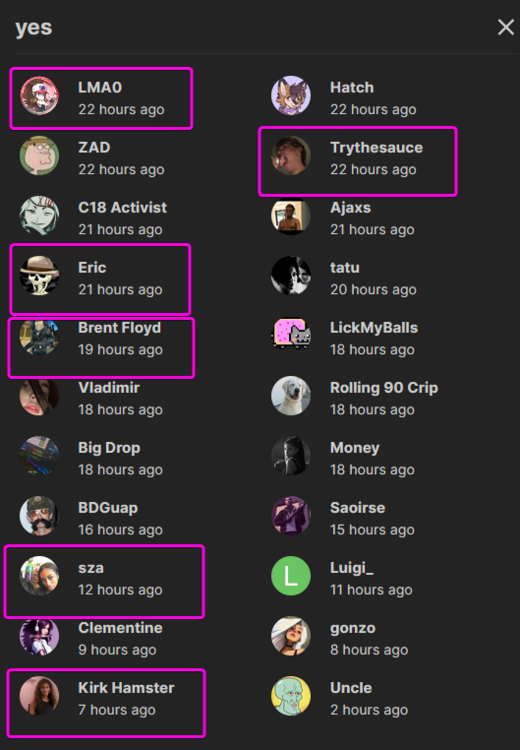


Account
Search
Configure browser push notifications
Chrome (Android)
- Tap the lock icon next to the address bar.
- Tap Permissions → Notifications.
- Adjust your preference.
Chrome (Desktop)
- Click the padlock icon in the address bar.
- Select Site settings.
- Find Notifications and adjust your preference.
Safari (iOS 16.4+)
- Ensure the site is installed via Add to Home Screen.
- Open Settings App → Notifications.
- Find your app name and adjust your preference.
Safari (macOS)
- Go to Safari → Preferences.
- Click the Websites tab.
- Select Notifications in the sidebar.
- Find this website and adjust your preference.
Edge (Android)
- Tap the lock icon next to the address bar.
- Tap Permissions.
- Find Notifications and adjust your preference.
Edge (Desktop)
- Click the padlock icon in the address bar.
- Click Permissions for this site.
- Find Notifications and adjust your preference.
Firefox (Android)
- Go to Settings → Site permissions.
- Tap Notifications.
- Find this site in the list and adjust your preference.
Firefox (Desktop)
- Open Firefox Settings.
- Search for Notifications.
- Find this site in the list and adjust your preference.