Jump to content
View in the app

A better way to browse. Learn more.

Superior Servers Forums

A full-screen app on your home screen with push notifications, badges and more.

To install this app on iOS and iPadOS
  1. Tap the Share icon in Safari
  2. Scroll the menu and tap Add to Home Screen.
  3. Tap Add in the top-right corner.
To install this app on Android
  1. Tap the 3-dot menu (⋮) in the top-right corner of the browser.
  2. Tap Add to Home screen or Install app.
  3. Confirm by tapping Install.

Ken Sparrow

VIP
  • Joined

  • Last visited

  1. Very pog
  2. I was on Chromium but same thing happened with x86 I also tried to delete cfg file to see if that did anything but didn't
  3. going to try again but got this and game crashed when equipping one of the backpacks happened second time as well
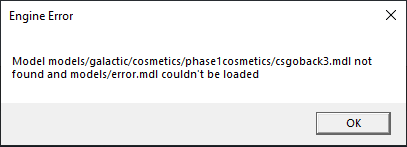
  4. gildan is a size bigger than u think
  5. dont unban pewdiepielookalike
  6. now where my fireworks at

Configure browser push notifications

Chrome (Android)
  1. Tap the lock icon next to the address bar.
  2. Tap Permissions → Notifications.
  3. Adjust your preference.
Chrome (Desktop)
  1. Click the padlock icon in the address bar.
  2. Select Site settings.
  3. Find Notifications and adjust your preference.