






LifefulNight
VIP
-
Joined
-
Last visited
-
 yeah apparently its overpriced, sadge.
 -
Buy upgrades then???
-
YAHOOOO!
-
Are permissions now required for trial-mod?
-
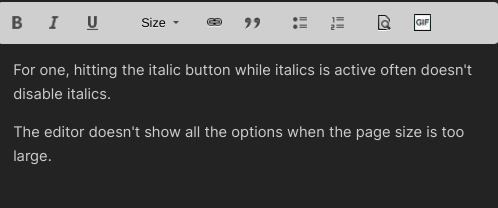
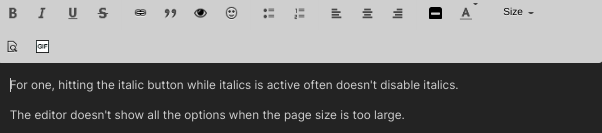
For one, hitting the italic button while italics is active often doesn't disable italics. The editor doesn't show all the options when the page size is too large. Editor with incorrect amount of tools (page zoom is normal but I am on chromebook) Editor with correct amount of tools (80% zoom on a chromebook in the Chrome Browser)
-
What classifies as a 'raidable'? ➢ Money Hostages Printers / Ink / Upgrade / Plate / Money Basket Any form of Lab Microwave Weed Pots / Seeds Shipments Weaponry Drugs BMIs Gun Licenses Food and Drinks (excluding Poop as it disappears)
-
I think the beginning sections are hidden in spoilers so that it doesn't get overcomplicated, like the last ruleset. I do agree about how the FAQ should stay unspoilered though
-
Whats a DarkRP Lawyer?
-
I don't believe Food and Drinks should be considered a raidable. That is one of the most pointless things to raid for. It can and probably will be abused to raid RP bases, considering that would void the RP Base sign.

